Monthly Release Update: More Control Over Syncs and Custom Payment Method Names

This month’s updates are all about giving you greater control, clearer visibility, and stronger alignment with your internal workflows.
From customizable sync preferences to better control over payment method names, here’s what’s new and how it helps you serve your customers more effectively.
🏷️ Custom Names for Payment Methods
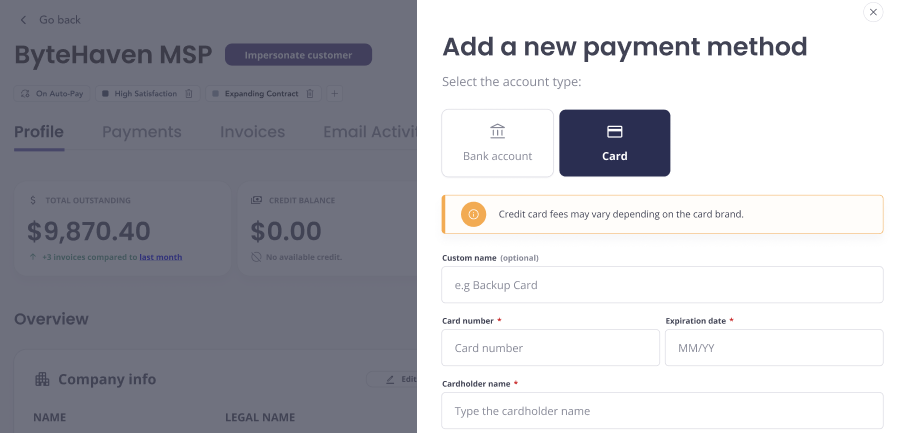
Make it personal, and clear. You can now assign custom names to any payment method, either during setup or after it’s added.
✨ What’s New?
Add a custom label to any saved payment method
Optionally, add labels to organize and display key details across the platform.
💡 Why It’s Helpful?
✅ Easily identify multiple payment methods at a glance
✅ Reduce confusion for customers during checkout
✅ Make internal billing workflows simpler
🧾 Tax Line Item Sync Control
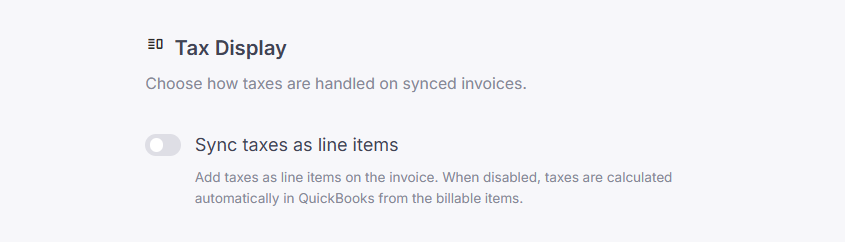
Control how taxes appear in your QuickBooks invoices. You now have a setting to choose whether taxes sync as separate line items or as part of the total.
✨ What’s New?
New setting under Sync Tool preferences
Sync taxes as line items or keep them bundled
💡 Why It’s Helpful?
✅ Align invoice details with your accounting practices
✅ Prevent confusion or mismatch in QuickBooks
✅ One-click configuration in your sync settings
Check your Sync Settings to configure your preferred tax treatment today.
⏱️ Time Entry Sync Settings
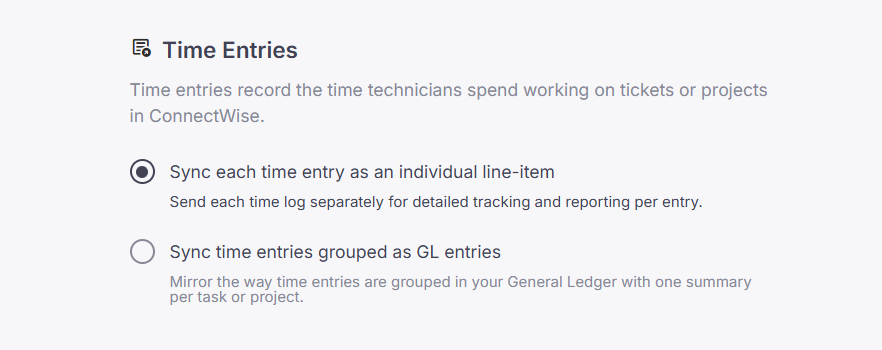
When syncing invoices from ConnectWise to QuickBooks, you can now choose how time entries are represented, summarized or detailed.
✨ What’s New?
Two new sync options for time entries:
Sync time entries grouped as GL entries: One summary per task or project
Sync each time entry as an individual line-item: Track and report each time log separately
Use descriptions and tooltips to clearly guide users and help them take the right action.
The default behavior is to sync each time entry as an individual line item.
💡 Why It’s Helpful?
✅ Align invoice details with your general ledger practices
✅ Choose greater transparency or enhanced simplicity to best fit your accounting goals.
✅ Avoid clutter in QuickBooks while retaining data flexibility
Update your preference in the Sync Tool settings today and make invoice syncing work your way.
🔁 Sub-Account Sync Support (CW & QBO)
More accurate syncs, now with sub-account support. We’ve extended our logic to handle items under sub-accounts across ConnectWise and QuickBooks Online.
✨ What’s New?
Detects and syncs items nested within sub-accounts
Ensures consistency between CW and QBO chart of accounts
Works with existing invoice and item syncs
💡 Why It’s Helpful?
✅ Avoid missing or misclassified transactions
✅ Better data consistency across systems
✅ Support for more complex accounting structures
No setup required, sub-account support is already active in your sync engine.
Need help?
Check the Help Center or contact our support team anytime.