Announcements

Follow new updates and improvements to Alternative Payments.

November 12th, 2025

๐Ÿš€ New Feature

This monthโ€™s updates are all about giving you greater control, clearer visibility, and stronger alignment with your internal workflows.

From customizable sync preferences to better control over payment method names, hereโ€™s whatโ€™s new and how it helps you serve your customers more effectively.


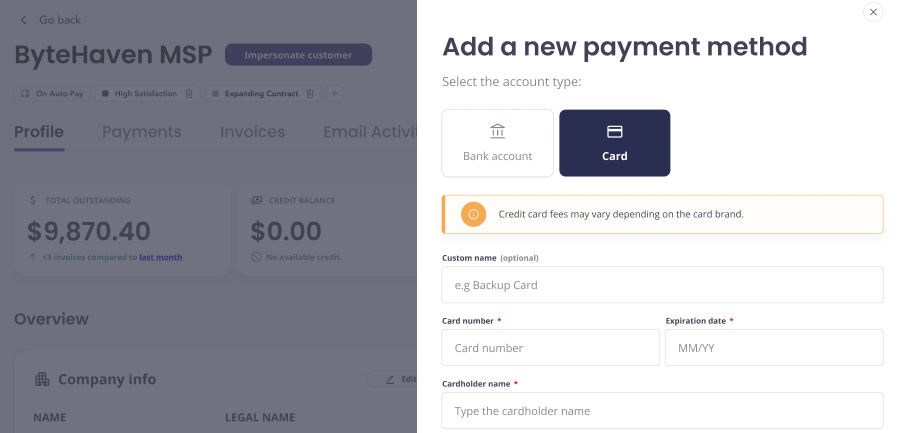
๐Ÿท๏ธ Custom Names for Payment Methods

Make it personal, and clear. You can now assign custom names to any payment method, either during setup or after itโ€™s added.

โœจ Whatโ€™s New?

  • Add a custom label to any saved payment method

  • Optionally, add labels to organize and display key details across the platform.

๐Ÿ’ก Why Itโ€™s Helpful?

โœ… Easily identify multiple payment methods at a glance
โœ… Reduce confusion for customers during checkout
โœ… Make internal billing workflows simpler


๐Ÿงพ Tax Line Item Sync Control

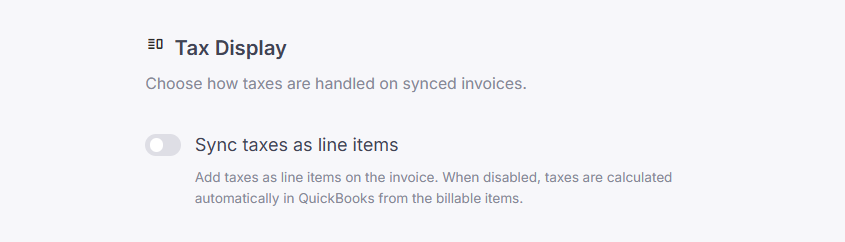
Control how taxes appear in your QuickBooks invoices. You now have a setting to choose whether taxes sync as separate line items or as part of the total.

โœจ Whatโ€™s New?

  • New setting under Sync Tool preferences

  • Sync taxes as line items or keep them bundled

๐Ÿ’ก Why Itโ€™s Helpful?

โœ… Align invoice details with your accounting practices
โœ… Prevent confusion or mismatch in QuickBooks
โœ… One-click configuration in your sync settings

Check your Sync Settings to configure your preferred tax treatment today.


โฑ๏ธ Time Entry Sync Settings

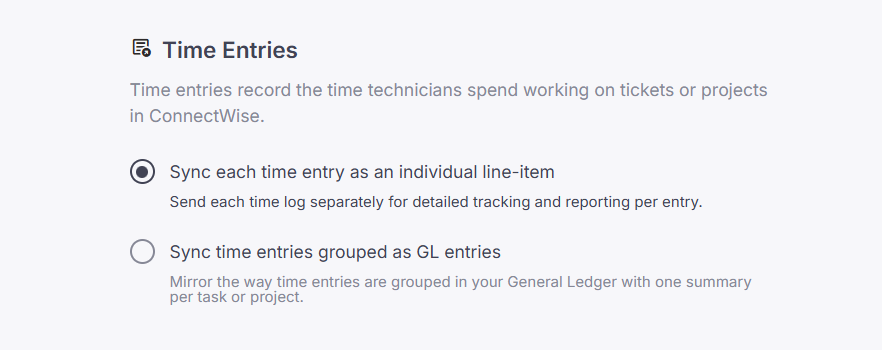
When syncing invoices from ConnectWise to QuickBooks, you can now choose how time entries are represented, summarized or detailed.

โœจ Whatโ€™s New?

  • Two new sync options for time entries:

    • Sync time entries grouped as GL entries: One summary per task or project

    • Sync each time entry as an individual line-item: Track and report each time log separately

  • Use descriptions and tooltips to clearly guide users and help them take the right action.

  • The default behavior is to sync each time entry as an individual line item.

๐Ÿ’ก Why Itโ€™s Helpful?

โœ… Align invoice details with your general ledger practices
โœ… Choose greater transparency or enhanced simplicity to best fit your accounting goals.
โœ… Avoid clutter in QuickBooks while retaining data flexibility

Update your preference in the Sync Tool settings today and make invoice syncing work your way.


๐Ÿ” Sub-Account Sync Support (CW & QBO)

More accurate syncs, now with sub-account support. Weโ€™ve extended our logic to handle items under sub-accounts across ConnectWise and QuickBooks Online.

โœจ Whatโ€™s New?

  • Detects and syncs items nested within sub-accounts

  • Ensures consistency between CW and QBO chart of accounts

  • Works with existing invoice and item syncs

๐Ÿ’ก Why Itโ€™s Helpful?

โœ… Avoid missing or misclassified transactions
โœ… Better data consistency across systems
โœ… Support for more complex accounting structures

No setup required, sub-account support is already active in your sync engine.


Need help?
Check the Help Center or contact our support team anytime.
September 24th, 2025

๐Ÿš€ New Feature

Weโ€™ve got some exciting updates this month that help you improve workflow automation, serve customers better, and expand your reach. Letโ€™s jump in:


๐Ÿ“ก Alternative Payments API: Webhooks

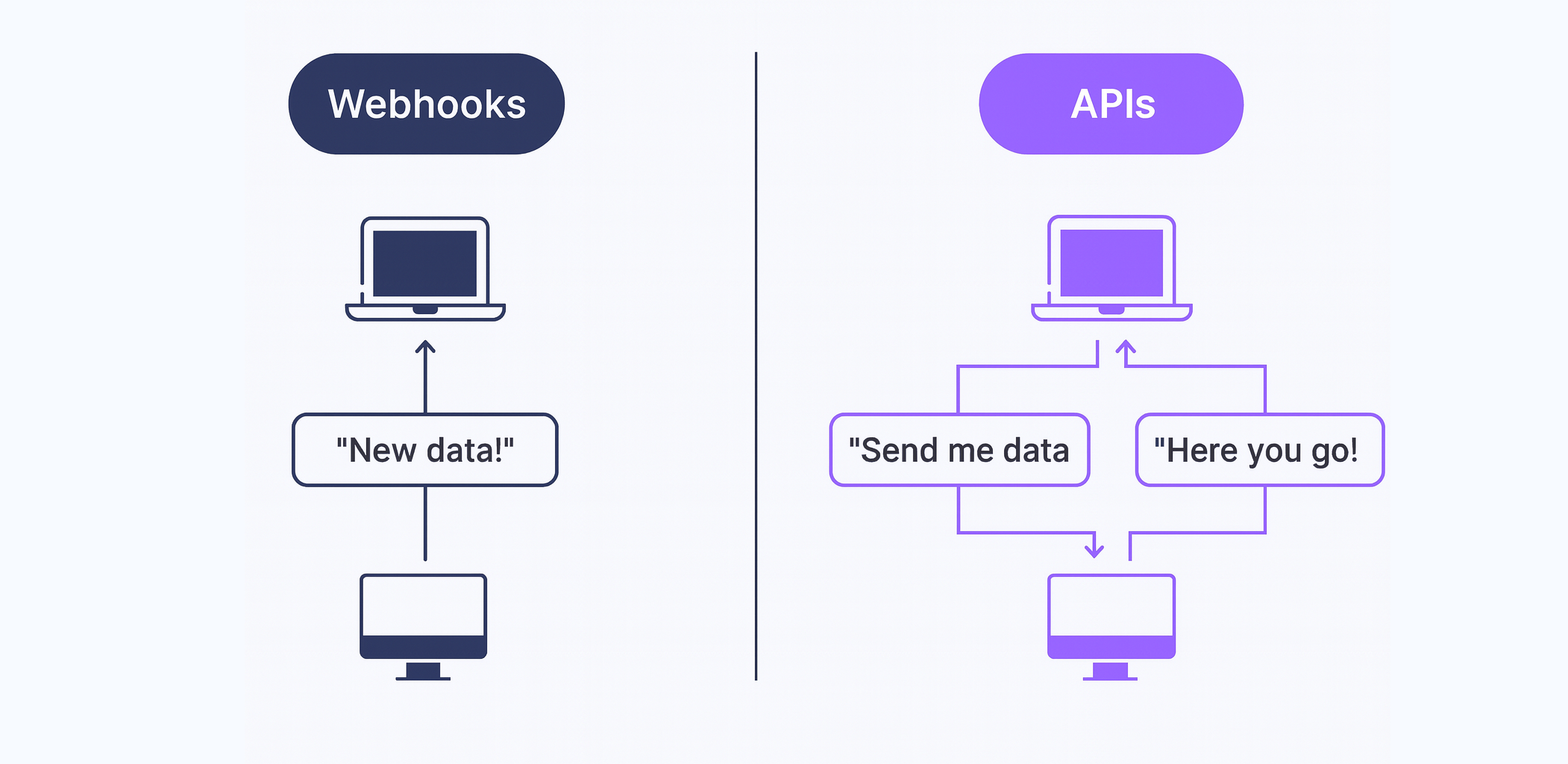
Automate more, react faster, and stay informed. Our webhooks framework is now live, giving you real-time notifications for key billing and payment events, so you can power smarter automations and tighter workflows.

โœจ Whatโ€™s New?

Event-driven notifications
Get notified on events like successful payments, failed payouts, chargebacks, and more, directly from the API.

Webhook management via API
Easily manage your subscriptions with new endpoints:

  • Create, view, delete, and retry webhook events directly from your app.

  • Supports use cases like customer onboarding, payment retries, and payout monitoring.

๐Ÿ” Explore the full API reference: View webhooks docs

๐Ÿ’ก Why Itโ€™s Helpful?
โœ… Trigger automations from real-time payment events
โœ… Monitor and retry failed events with ease
โœ… Simplify reconciliation and customer workflows


๐Ÿ“‹ Help shape our new Accounts Payable product

Weโ€™re working on a new Accounts Payable product to simplify how MSPs and Business Services companies handle vendor invoices, approvals, and payments. Before we finalize what to build first, weโ€™d love your feedback. Your experience will help us:

  • Understand where Accounts Payable creates the most friction today

  • Prioritize the features that matter most (intake, payments, compliance, forecasting)

  • Build a solution that complements your existing Accounts Receivable workflows

The survey takes 5โ€“7 minutes and there are no right or wrong answers, just your honest perspective.

๐Ÿ‘‰ Take the survey here

Thank you for helping us shape whatโ€™s next. Weโ€™ll share the results and our priorities with you.


๐Ÿ“ฃAudience Selection for Email Notifications

Send the right message to the right customer. You can now control who receives payment reminders and summaries using tags or individual customer selections.

โœจ Whatโ€™s New?

  • Filter your email notifications by tags or specific customers

  • Ensure summaries and reminders go only to relevant recipients

๐Ÿ’ก Why Itโ€™s Helpful?
โœ… Tailored communication for different customer segments
โœ… Avoids inbox overload for your clients
โœ… Helps deliver a more professional, targeted experience


๐Ÿ We Are Now Live in Canada!

Weโ€™re thrilled to announce our official launch in Canada. A dedicated team from coast to coast is now supporting Canadian MSPs with local support and native CAD payment processing to help Canadian MSPs scale faster.

๐Ÿ’ก Why Itโ€™s Helpful?
โœ… Accelerate cash flow with localized Accounts Receivable tools
โœ… Partner with a team that understands Canadian MSPs
โœ… Same great experience, now closer to home

๐Ÿ”— Read the full announcement


If you need assistance, our team is here to help. Visit the Help Center or contact our team anytime

August 11th, 2025

๐Ÿš€ New Feature

๐ŸŽ‰ Announcement

This month, Alternative Payments is rolling out new ways to make your workflows smoother and payments faster. From API integrations to timezone settings and accounting sync improvements, every update is designed to give you more control and flexibility.


๐Ÿ‘ฉโ€๐Ÿ’ปAlternative Payments API

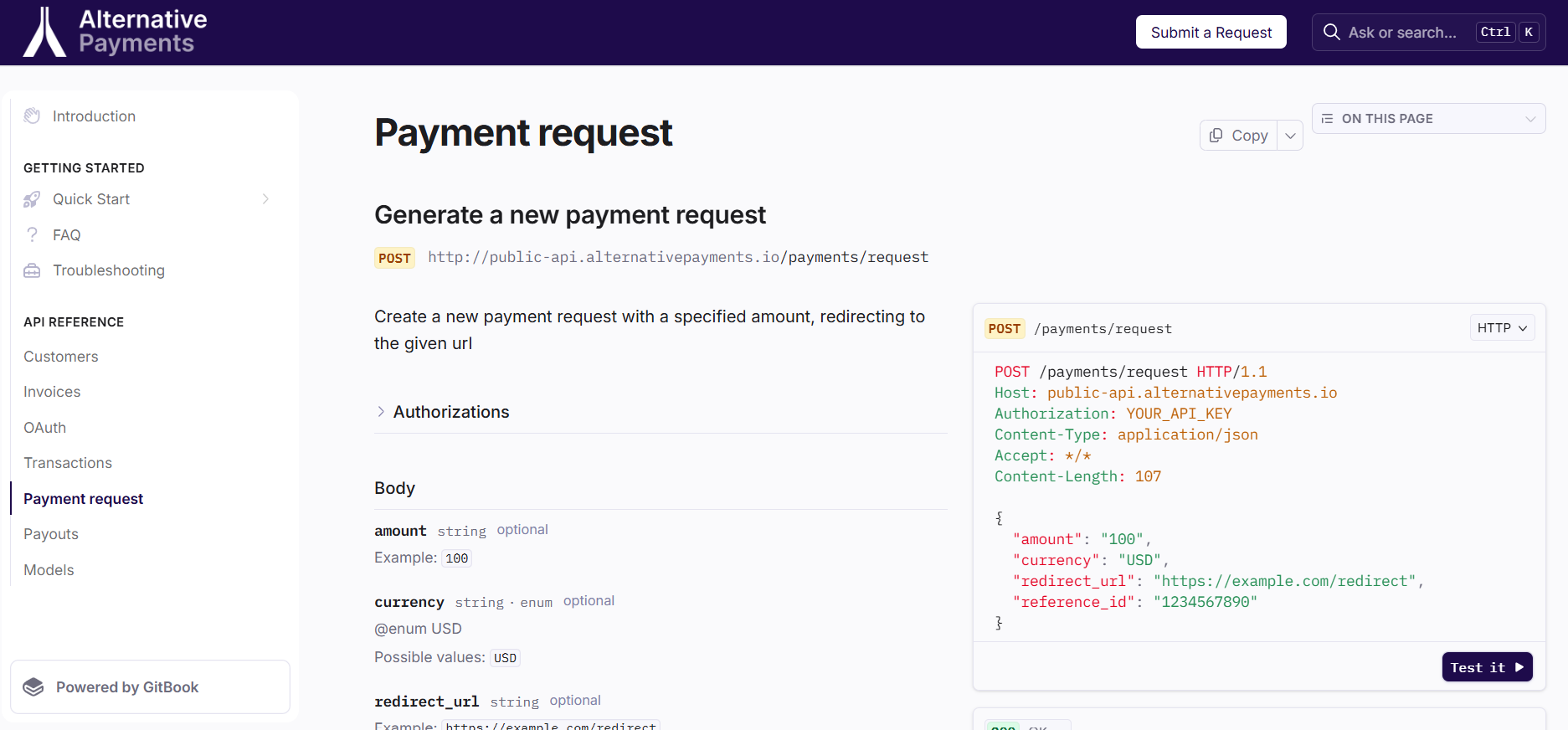
You can now connect Alternative Payments directly into the tools and workflows you already use, no waiting on manual processes. The Alternative Payments API lets you or your technology partners build a seamless payment experience for your customers.

๐Ÿ” Access full documentation here: docs.alternativepayments.io

โœจ Whatโ€™s New?

  • REST API endpoints for creating payment requests, managing invoices, transactions, payouts, customers, and more capabilities coming soon.

  • API keys and permissions for secure integration

  • Endpoints for real-time payment status updates

๐Ÿ’ก Why Itโ€™s Helpful?
โœ… Build custom payment experiences for your customers
โœ… Automate workflows without manual intervention
โœ… Gain flexibility to integrate Alternative Payments into your existing stack


๐Ÿ“‘ Quoter Integration: Faster Payments, Less Friction

Quoter now uses our API so your customers can pay for quotes instantly through a secure hosted checkout. Once you set it up on the Quoter platform, your customers can pay with a single click, redirected to a streamlined payment page with no extra steps required.

๐Ÿ‘‰ Follow the step-by-step setup guide to add Alternative Payments as a payment gateway in your Quoter account.

โœจ Whatโ€™s New?

  • Hosted checkout automatically included in Quoter-generated quotes

  • Seamless handoff from quote to payment in seconds

  • Secure checkout experience your customers can trust

๐Ÿ’ก Why Itโ€™s Helpful?
โœ… Convert quotes to cash faster than ever
โœ… Eliminate the delay between sending a quote and receiving payment
โœ… Deliver a simple, consistent payment experience every time


๐Ÿ•’ Timezone Configuration

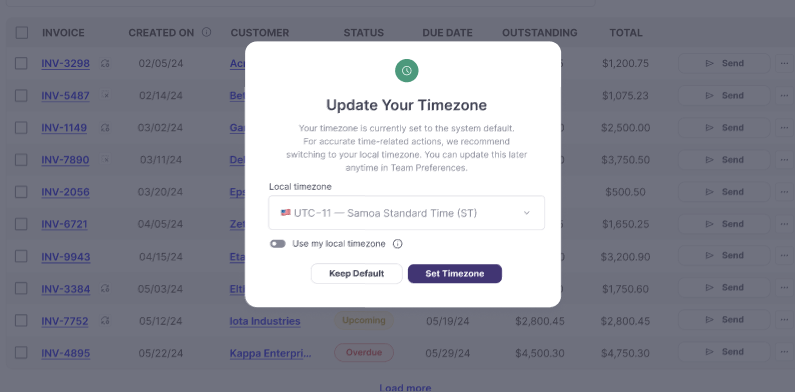
You can now choose the timezone for your Alternative Payments dashboard, ensuring that all timestamps and reporting align with your local time. When an admin logs in, a timezone selection prompt will appear, allowing them to set it right away.

โœจ Whatโ€™s New?

  • Account-wide timezone settings

  • Unified timestamps across invoices, transactions, payouts, reports, and schedules

  • Consistent timing in email notifications and reminders

  • Changes apply instantly, no downtime or reconfiguration

๐Ÿ’ก Why Itโ€™s Helpful?
โœ… Accurate reporting without time conversions
โœ… Consistent data for you and your customers
โœ… Simplifies reconciliation and audit processes


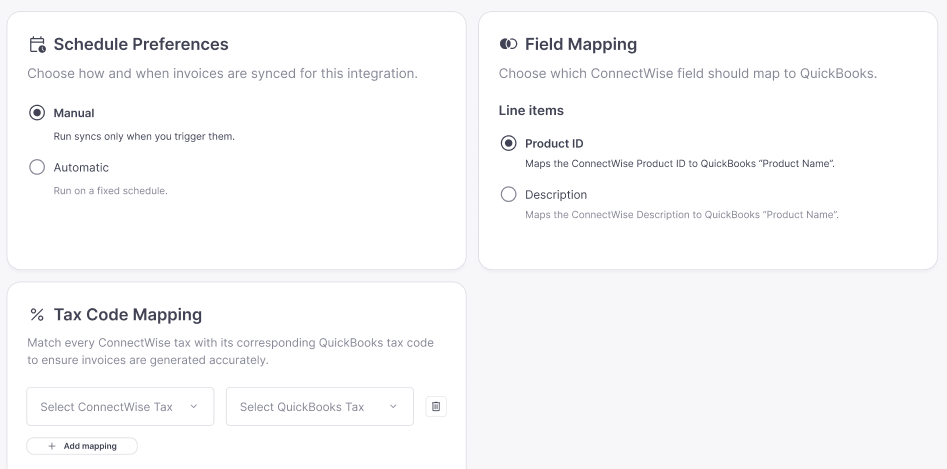
๐Ÿ”„ Settings for ConnectWise โ†’ QuickBooks Sync Tool

More control over how your data syncs between ConnectWise and QuickBooks.

โœจ Whatโ€™s New?

  • Choose sync frequency (daily, hourly)

  • Switch between automatic or manual sync

  • Configure line item mapping and tax mapping to match your accounting needs

๐Ÿ’ก Why Itโ€™s Helpful?
โœ… Aligns perfectly with your accounting workflows
โœ… Prevents data mismatches and sync errors
โœ… Saves time with precise, automated mapping


If you need assistance, our team is here to help. Visit the Help Center or contact our team anytime

July 7th, 2025

๐Ÿš€ New Feature

Here are the key product updates this month to help you grow your business, improve customer communication, and simplify workflows.


๐ŸŽฏ New Partner Referral Program & Dashboard

Turn your network into revenue. With the new Referral Program, you can earn a 10% revenue share, for as long as you remain an active partner, for every client you refer, while your referrals enjoy a 10% discount on their subscription.

โœจ Whatโ€™s New?

  • Streamlined Sharing Experience
    Generate personalized links and emails to make referring quick, professional, and effective.

  • End-to-End Referral Management
    Manage the entire referral process in one place, from sending personalized referral emails to tracking status and payouts.

  • Real-Time Tracking & Transparency
    See referral progress, earnings, and payout history instantly with your dedicated dashboard.

๐Ÿ’ก Why Itโ€™s Helpful?

โœ… Unlock a recurring revenue stream
โœ… Deliver immediate value to your network with discounted pricing
โœ… Track referrals and payouts with transparency
โœ… Simplify your referral workflow with full control and visibility

Ready to start referring? Visit your Referral Dashboard and send your first referral today.

๐Ÿ” Learn More: Referral Program


โœ‰๏ธ Additional Variables in Automated Emails

Customize your customer communications even further. You can now include Days Past Due and Customer Name as variables in your automated email reminders.

โœจ Whatโ€™s New?

  • Additional Variables Available
    Personalize reminders with customer names and the number of days past due for clarity.

๐Ÿ’ก Why Itโ€™s Helpful?

โœ… Create more relevant, personal emails
โœ… Improve customer response and payment rates
โœ… Reduce manual editing of reminder templates

Try updating your email templates today to include these new variables.


๐Ÿ’ณ Autopay Indicator in Summaries and Reminders

No more confusion about autopay status. Email summaries and reminders now include an autopay icon indicator for invoices enrolled in autopay.

โœจ Whatโ€™s New?

  • Visual Autopay Indicator
    An easy-to-spot icon showing invoices set for autopay.

๐Ÿ’ก Why Itโ€™s Helpful?

โœ… Reduces customer payment uncertainty
โœ… Minimizes unnecessary payment inquiries
โœ… Provides a clear and professional communication experience


Weโ€™re excited to see how these updates empower your team and customers this month.

Need help? Visit the Help Center or contact our team anytime.

June 10th, 2025

๐Ÿš€ New Feature

Weโ€™ve shipped a few product updates to make your workflow smoother and help you get paid faster:


๐Ÿ“ฉ Invoice PDF Attachments

PDFs are now included in emails: less friction, faster action. PDF copies of invoices are now automatically attached to your email reminders, no setup required and no manual steps.

With Invoice PDF Attachments, your customers get the billing details they need right in their inbox. That means fewer delays, less confusion, and faster payments.

โœจ Whatโ€™s New?

  • Automatically attach PDF copies of invoices to email reminders sent to customers.

๐Ÿ’ก Why Itโ€™s Helpful?

โœ… Improves customer experience by providing invoices directly in their inbox
โœ… Reduces the need for manual sharing of invoices
โœ… Ensures accuracy and transparency of billing

Ready to try it out? Create a test invoice, send yourself a reminder, and check your email to see the PDF attached.


๐Ÿ”™ Partner-Initiated Refunds

Refunds just got easier. You can now manage refunds directly from the partner dashboard, no need to contact support or wait for back-and-forth communication.

With Partner-Initiated Refunds, you can process refunds quickly and efficiently for your customers. This means faster resolutions and improved customer experiences.

๐Ÿ” Learn More: Refund Management

โœจ Whatโ€™s New?

  • Initiate refunds directly from the partner dashboard, no support ticket needed.

  • Manage refund requests from start to finish without leaving the platform.

๐Ÿ’ก Why Itโ€™s Helpful?

โœ… Resolve refund requests quickly and efficiently
โœ… Provide immediate customer satisfaction
โœ… Reduce support wait times and friction

No more waiting for support to process refunds. Get started today from your partner dashboard!


๐Ÿ”— CPQ Integration

Turn quotes into payments without disrupting your workflow. You can now connect your CPQ tool directly to Alternative Payments, making it simple to accept quote payments within your existing workflow.

With the CPQ integration, customers get a consistent, streamlined payment experience, right from the quote.

๐Ÿ” Learn More: CPQ Integration

โœจ Whatโ€™s New?

  • Integrate your Alternative billing link into CPQ quotes for a smooth quoting and billing process.

  • Automate the flow of quotes to payments, reduce manual work, and improve your teamโ€™s efficiency.

๐Ÿ’ก Why Itโ€™s Helpful?

โœ… Enhance your customers' payment experience
โœ… Streamline the quote-to-cash process with fewer steps
โœ… Save time and focus on closing deals faster

Get started today by following the CPQ Integration Guide linked above!


Need help? Visit the Help Center or reach out to our team. We are here to help you make the most of these updates.

April 7th, 2025

๐Ÿš€ New Feature

Supporting your customers just got a whole lot easier.

With one click, you can now access the dashboard exactly as your customer sees itโ€”making it faster to troubleshoot issues, verify setups, and provide support with confidence. No more waiting on screenshots or back-and-forth explanations.


๐Ÿ” Whatโ€™s New?

  • โ€œImpersonate Customerโ€ Button
    Access this from the customer profile page in your dashboard.

  • Real-Time Visibility
    Jump into your customerโ€™s portal experience to troubleshoot issues or verify settings.


๐Ÿ’ก Why Itโ€™s Helpful

  • โœ… Solve issues faster without relying on your customer

  • โœ… Verify setups and configurations first-hand

  • โœ… Provide support with total confidence


No more guessing. No more back-and-forth. Just clear, direct access to the experience your customer is having.

Try it out now from any customer profile in your dashboard!

Need help? Check the Help Center or contact our team.

February 21st, 2025

๐Ÿš€ New Feature

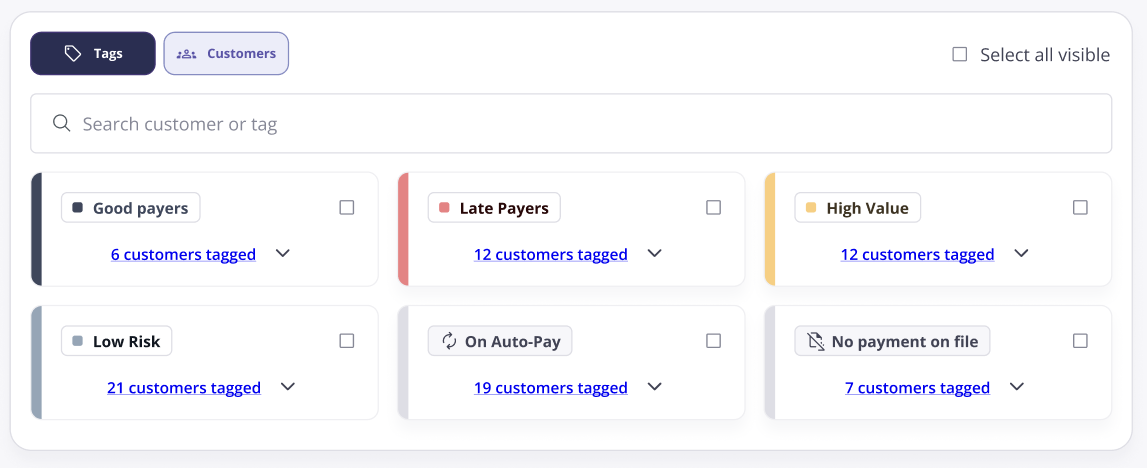
We are excited to introduce Customer Tagging, a powerful new feature designed to enhance how you categorize and manage your customers. With this flexible tagging system, partners can now assign custom labels to customers, making segmentation easier, smarter, and more efficient.

With Customer Tagging, you can:

  • โœ… Create Custom Tags โ€“ Define unique tags with names, descriptions, and colors.

  • โœ… Assign Customers to Tags โ€“ Easily associate one or multiple tags with a customer.

  • โœ… Filter & Search โ€“ Quickly find and group customers based on assigned tags.

  • โœ… Manage Tags Seamlessly โ€“ Edit, delete, and organize tags in an intuitive interface.

  • โœ… Auto-Tagging (System Tags) โ€“ Automated tags that categorize customers based on predefined attributes, such as On Autopay and No Payment Method.

Start organizing, filtering, and taking action on customer insights like never before. Get started today and experience the power of smart customer segmentation!


February 21st, 2025

๐Ÿš€ New Feature

We're thrilled to announce a significant update enhancing Auto-Pay functionality for our partners and users.

This update introduces enhanced flexibility when creating Auto-Pay Rules:

  • โœ… Agreement Names: Partners can now define rules based not only on agreement types but also agreement names.

  • โœ…Expanded Integration Support:

    • For ConnectWise: Compatibility with both agreements and agreement types.

    • For Autotask: Support for contracts and contract types.

This addition ensures precise adaptability to unique business requirements, fostering improved efficiency and a seamless experience across platforms.

We hope this enhancement brings great value to your operations, and we look forward to your feedback.


February 21st, 2025

๐Ÿš€ New Feature

We are thrilled to announce the implementation of a long-anticipated feature aimed at enhancing flexibility and improving user experience.

  • Enhanced Flexibility: Customers can now make multiple payments toward a single invoice, reducing financial strain.

  • Transparent Monitoring: Real-time updated balance tracking with clear payment histories accessible to both customers and partners.

How to Use:

  1. Navigate to the desired invoice within the system.

  2. Choose the specific amount you wish to charge.

  3. Confirm the transaction and remaining balances will update accordingly.

Weโ€™re excited to bring you these improvements and look forward to supporting your business growth.